
Getting Started as Super Admin and Admin in zipBoard
Super Admins and Admins in zipBoard manage an organization's projects, users and settings. Both roles can add members, create projects and set up stamps, statuses and tags; only Super Admins can add or remove other Super Admins and access billing. This guide shows what each role can do and how to get started.
What can Super Admins and Admins do?
Here’s a breakdown of what each role can manage in zipBoard:
| Capability | Super Admin | Admin |
|---|---|---|
| Add/remove reviewers | ✅ | ✅ |
| Add/remove clients | ✅ | ✅ |
| Add/remove collaborators | ✅ | ✅ |
| Add/remove managers | ✅ | ✅ |
| Add/remove super admins | ✅ | ❌ |
| Delete own projects | ✅ | ✅ |
| Delete any projects | ✅ | ✅ |
| Add project | ✅ | ✅ |
| Archive own projects | ✅ | ✅ |
| Access reports | ✅ | ✅ |
| Add integrations | ✅ | ✅ |
| Access billing | ✅ | ❌ |
How do I get started as a Super Admin?
If you're a Super Admin, follow these steps to set up your organization in zipBoard:
-
Create an organization
Go to https://app.zipboard.co/login and sign up or log in using your Google or Microsoft account. If you don't see the organization options, see How do I create an organization? below.
-
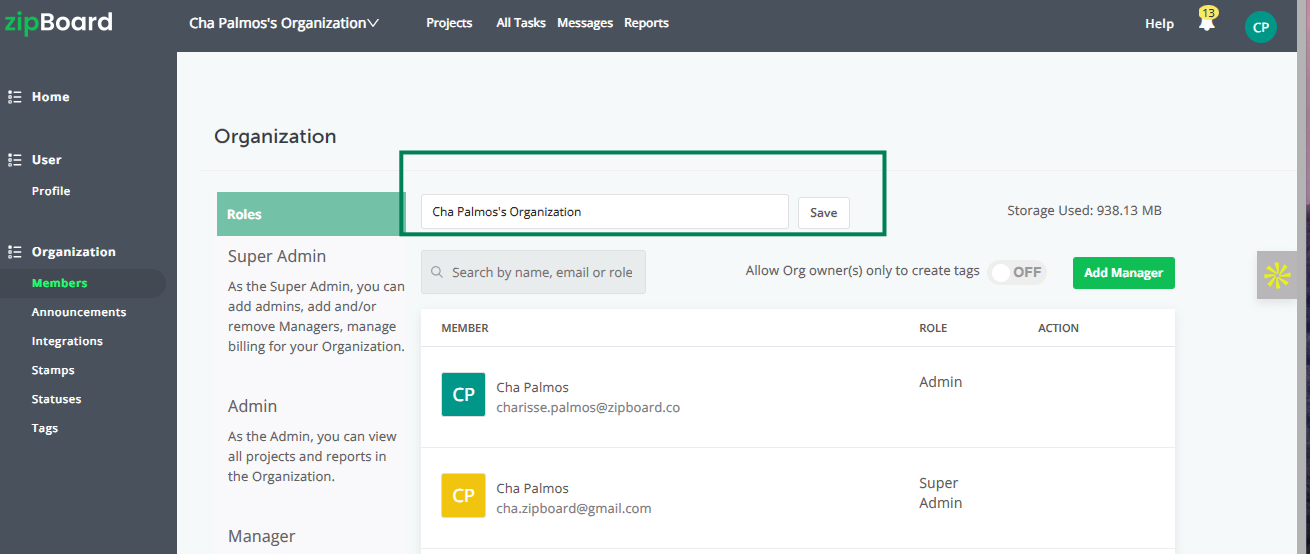
Change the organization name
Once logged in, you can update your organization’s name under your Organization Settings.
-
Add your team
Start by adding Admins and Managers to help you manage projects and teams.
-
Set up workflows
Configure your Stamps, Statuses and Tags to streamline project tracking.
-
Review billing
As a Super Admin, you can view and manage your billing and subscription settings.
How do I get started as an Admin?
If you're an Admin, here's what you can do to get started:
-
Add team members
You can add Managers and other Admins to your organization.
-
Change the organization name
You can also update the organization name under settings.
-
Set up workflows
Define your Stamps, Statuses and Tags to organize feedback and tasks.
-
Create projects
Admins can start their own projects and manage them from start to finish.
Next step: follow the step-by-step guide for project managers.
How do I create an organization if I don't see the option?
You don't need to contact support. An organization is created automatically when you upgrade to a paid plan, so if you don't see the organization options yet, upgrade your plan. See Managing Your Billing and Subscription.
Why am I added to all the projects in my organization?
If you're the owner of the organization, you are added by default to every project a manager creates in your organization.
Need more help?
- Check out our latest updates in the zipBoard release notes.
- Want a hands-on experience? Request a demo and explore how zipBoard can streamline your workflows.
- Or start your 14-day free trial.
Related guides
- Understanding Super Admins & Admins
- What’s the difference between Super Admin, Admin, Manager, Collaborator, Client and Guest roles?
- How to Add Members from an Organization or Project?
- How to Remove Members from an Organization or Project?
- Getting Started as Project Managers
- Managing Your Billing and Subscription