
What happens if an annotation is edited or deleted while I'm replying?
If you start typing a response to a comment and the author modifies or removes that original comment before you hit send, zipBoard detects this "stale thread" scenario and alerts you instantly, preventing lost work or out-of-context replies.
In fast-moving collaborative reviews, uncoordinated updates to comment threads create two major risks:
- Delayed Feedback: Replying to a comment that was just deleted can cause your text to disappear into the void or get posted without a parent thread, leaving team members confused about what you are referencing.
- Replying to Outdated Instructions: If a reviewer changes their request (e.g., changing "Remove this section" to "Keep this section, but rephrase"), submitting your original reply without realizing they revised their comment leads to misaligned communication and redundant back-and-forth.
How zipBoard Protects Your In-Progress Replies
Because zipBoard uses an on-demand update system, incoming changes do not auto-refresh your page while you are typing. However, to ensure accuracy, zipBoard validates thread integrity at the moment of submission. Even if you haven't clicked the "New Updates" button yet, zipBoard checks whether the parent comment has changed or been removed while you were writing.
What You’ll See When an Annotation is deleted?
- You open an existing comment or visual annotation thread and start drafting a reply.
- Another collaborator edits or deletes that original comment. Above your comment panel, a green "New Updates" button appears, but you keep typing without clicking it.
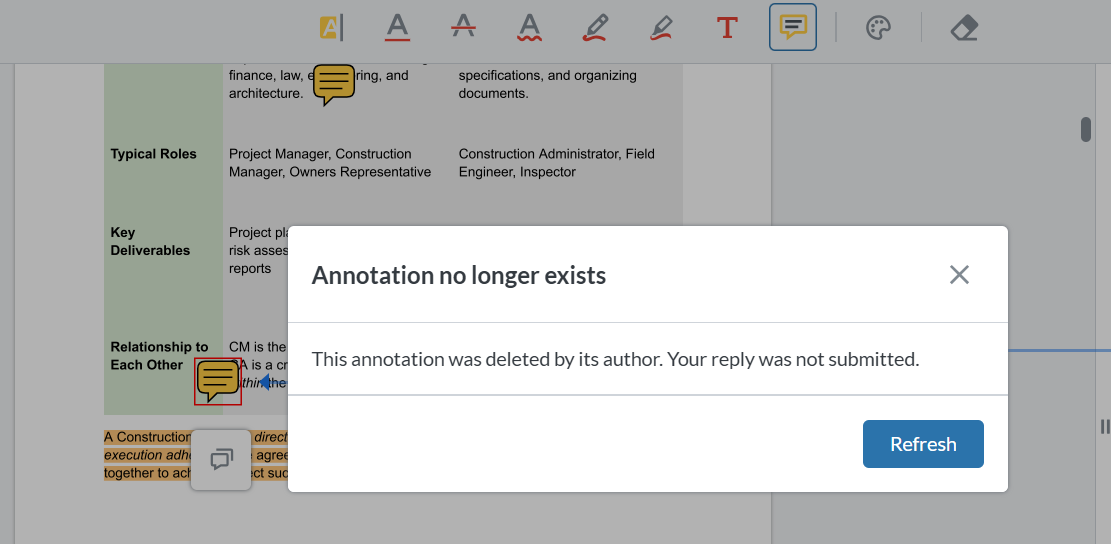
- Click Submit/Reply. Instead of blindly posting your text, zipBoard flags that the parent comment has changed since you began typing:
- If the comment was edited: zipBoard notifies you that the original text was updated, allowing you to review their revised comment before confirming your submission.
- If the comment was deleted: zipBoard alerts you that the parent thread is no longer available and preserves your draft text so you can copy or repurpose it elsewhere.
Use Cases
1. AEC Structural & Architectural Reviews
A structural engineer drops a pin on a CAD drawing requesting a beam thickness change. As an architect, you start typing a detailed reply with calculation notes. While you type, the engineer realizes their mistake and deletes the pin.
- Why it matters: When you click Submit, zipBoard warns you that the pin was deleted. Your drafted calculation notes are preserved, preventing your response from floating as an orphaned comment on an erased blueprint mark.
2. Technical Writing & eLearning Courseware QA
A Subject Matter Expert (SME) leaves feedback on a SCORM module slide saying, "Delete this video link." You begin typing a reply explaining why the video is required for compliance. In the meantime, the SME updates their comment to: "Never mind, update the video link to v2."
- Why it matters: zipBoard flags the edit before posting your reply. You avoid sending an outdated argument against a request the SME has already retracted.
Frequently Asked Questions
1. Will zipBoard erase my typed response if the original comment gets deleted?
No. Your draft text is never silently erased. If the parent comment is deleted before you submit, zipBoard preserves your text in the input box so you can save it or paste it into a new thread.
2. What happens if I click the "New Updates" button before submitting my reply?
Clicking "New Updates" pulls in the latest thread activity while holding your current draft text safely in the reply field. You can then review the modified parent comment and hit submit when ready.
3. Does this validation apply to guest reviewers and external clients?
Yes. External clients and guest reviewers accessing the workspace via guest links experience the exact same thread-protection checks as logged-in team members.
Learn More About Real-Time Sync
- Does zipBoard show real-time updates on comments? - zipBoard Help
- What is the Best Way to Run Real Time Reviews with External Clients? - zipBoard Help
- What to do if comments aren't updating live? - zipBoard Help
- Do external clients need an account to collaborate in real-time? - zipBoard Help
- How does the New Updates button differ from the zipBoard email notification? - zipBoard Help
- How do real-time updates work with active filters and sort orders? - zipBoard Help