
How Do I Notify Subject Matter Experts (SMEs) That Their Content Review Is Overdue?
Subject Matter Experts (SMEs) are notoriously busy, and when review requests sit in their inboxes, manual follow-ups consume your writing time. To get overdue reviews turned around quickly, your notification needs to eliminate the immediate operational barriers that caused them to skip the review in the first place.
New Feature! You can now track reviewer status in each asset and your pending content review across every project in one place! find more about the feature: https://zipboard.co/track-all-your-pending-document-and-content-reviews-in-one-place/
The Anatomy of an Effective Overdue Reminder
An expert reviewer rarely ignores a draft out of spite; they ignore it because of review friction. If your reminder forces them to dig through Slack histories for a file link or figure out their login credentials for a legacy system, they will close the email.
To guarantee an immediate response, an overdue notification must do three things:
- Provide Instant Access: Give them a direct path to the file with zero login hoops.
- Show Clear Accountability: Display who else has already signed off so they see they are the holdout.
- Specify the Exact Task: Don't ask them to "review the document"; show them exactly which section or task requires their specific technical eye.
4 Steps to Automate and Streamline Overdue SME Alerts
Using a browser-first document management and review platform like zipBoard, you can transition from awkward manual nagging to automated, high-context reminders.
1. Trigger System-Generated Deadline Reminders
Stop wasting your mornings drafting "just checking in" emails. Let your workspace automation handle the baseline schedule.
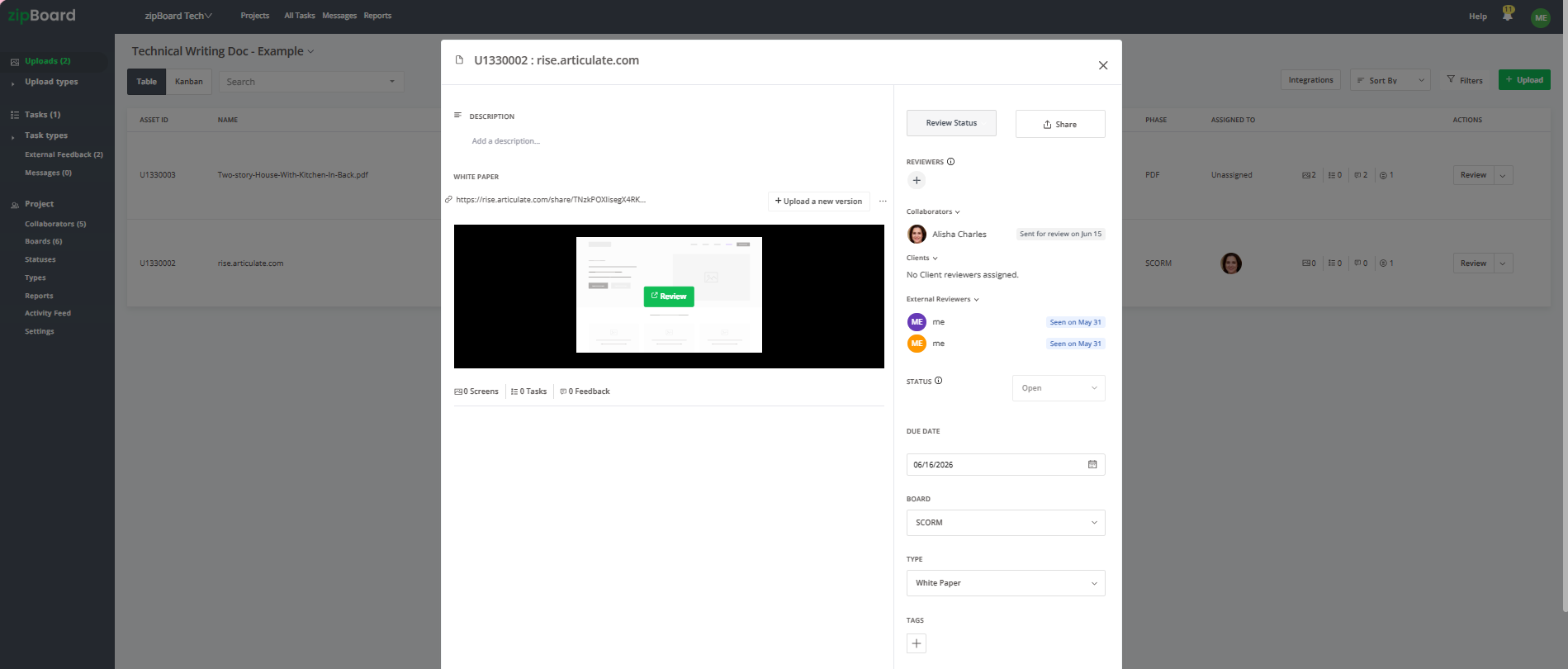
- The Shift: Move from manual tracking calendars to automated date-based triggers.
- The Action: When you upload your document asset, assign a firm Due Date. The platform’s notification framework tracks this timeline automatically. If the deadline passes without a status update, the system pings the assigned SMEs with structured email summaries, keeping the task top-of-mind without you playing the role of project referee.
2. Lower the Entry Barrier with No-Login Links
The fastest way to get a busy engineer to clear an overdue task is to make the action item require absolute zero administrative effort.
- The Shift: Swap access-restricted file paths for immediate browser links.
- The Action: Ensure your automated notification includes a secure, external sharing link configured for a "no-login, frictionless experience." When the SME clicks the overdue link from their phone or desktop, the document opens natively in their web browser. They can immediately jump into the canvas and begin adding feedback without creating an profile or resetting a password.
3. Surface Peer Accountability in a Single Window
Sometimes, the best incentive for an SME to complete a review is seeing that their colleagues have already finished theirs.

- The Shift: Replace isolated individual follow-ups with transparent, team-wide progress tracking.
- The Action: When an SME opens the link, they can see in a single window exactly who else was invited, when the invite went out, and who has already marked it as approved. Realizing they are the final bottleneck naturally accelerates their review behavior.
4. Deploy Precise @Mentions for High-Priority Blockers
If a global deadline reminder doesn’t get a response, cut through the inbox noise by targeting the exact paragraph or layout issue holding up production.

- The Shift: Move from vague, document-wide requests to hyper-targeted, localized task updates.
- The Action: Instead of asking for a general update, open the drawing or document canvas and create a specific task on the problem area. Use the @mention feature to tag the expert directly inside the task comment or markup thread. This will send an instant notification to your teammates' email.
Best Practices for Reclaiming Review Momentum

Always Keep an Eye on Your Activity Feed
Before you send a high-priority escalation message, take one look at your centralized activity feed. This dashboard gives you an instant, chronological look at all recent updates, resolved issues, and comment replies across the project.
Frequently Asked Questions (FAQ)
What if an SME leaves unorganized text comments that cause more delays?
zipBoard completely eliminates vague text feedback. When an SME responds to an overdue alert and leaves a markup, whether using a pencil tool, highlighter, or rectangle, the system automatically captures a background screenshot of their exact browser view and attaches it to a new task item. Your writing team sees the exact layout context, removing any need for clarifying meetings.
Can I share the no-login review link to external reviewers?
Absolutely. The external sharing feature allows you to generate secure, shareable links tailored for collaborators outside your main corporate directories. You can adjust permissions, so you can decide what external reviewers can see and access, while keeping your core workspace configurations completely secure.