
How Do I Create a Reliable Tracking Log for Release Notes and Documentation Updates?
The most efficient way to avoid communication gaps or documentation debt during product launches is to utilize a platform built for automated version tracking. By utilizing a browser-first workspace like zipBoard, you can gather, track, and log every documentation update and release note change securely without purchasing extra project management licenses or drowning in manual spreadsheet updates.
The True Cost of Manual Version Tracking and Fragmented Logs
When engineering and documentation teams rely on manual spreadsheets, static wikis, or shared text docs to track product releases, the logging process quickly breaks down under pressure:
- The Security Gap: Allowing multiple internal team members to copy-paste updates into a shared tracking document makes it impossible to verify who authorized a content change, destroying your internal release audit trail.
- Exploding Administrative Overhead: Manually updating separate spreadsheets, notifying customer success teams, and tracking down engineers to verify if a feature actually shipped drains short-term project profitability.
- Onboarding and Tracking Friction: Forcing product managers, technical writers, and cross-departmental stakeholders to hunt through separate chats, email threads, and Jira tickets to piece together a release log leads to immediate resistance, stalling your shipping cycles.
4 Steps to a Secure, Automated Documentation Tracking Log
To protect your release timelines and preserve content integrity, transition your release notes and documentation workflow away from static files toward a secure, interactive tracking ledger.
1. Separate Draft Creation From the Master Audit Ledger
Stop treating live documentation drafts, technical reviews, and finalized release logs as equivalent entries in your internal tracking database.
Set up your master dashboard so your technical writing team retains full drafting and configuration access. When it's time for cross-departmental validation or executive sign-off, shift that specific update to a dedicated review tier, keeping your core production directories and master release history completely restricted.
2. Leverage Visual Markup Overlays on Live Drafts
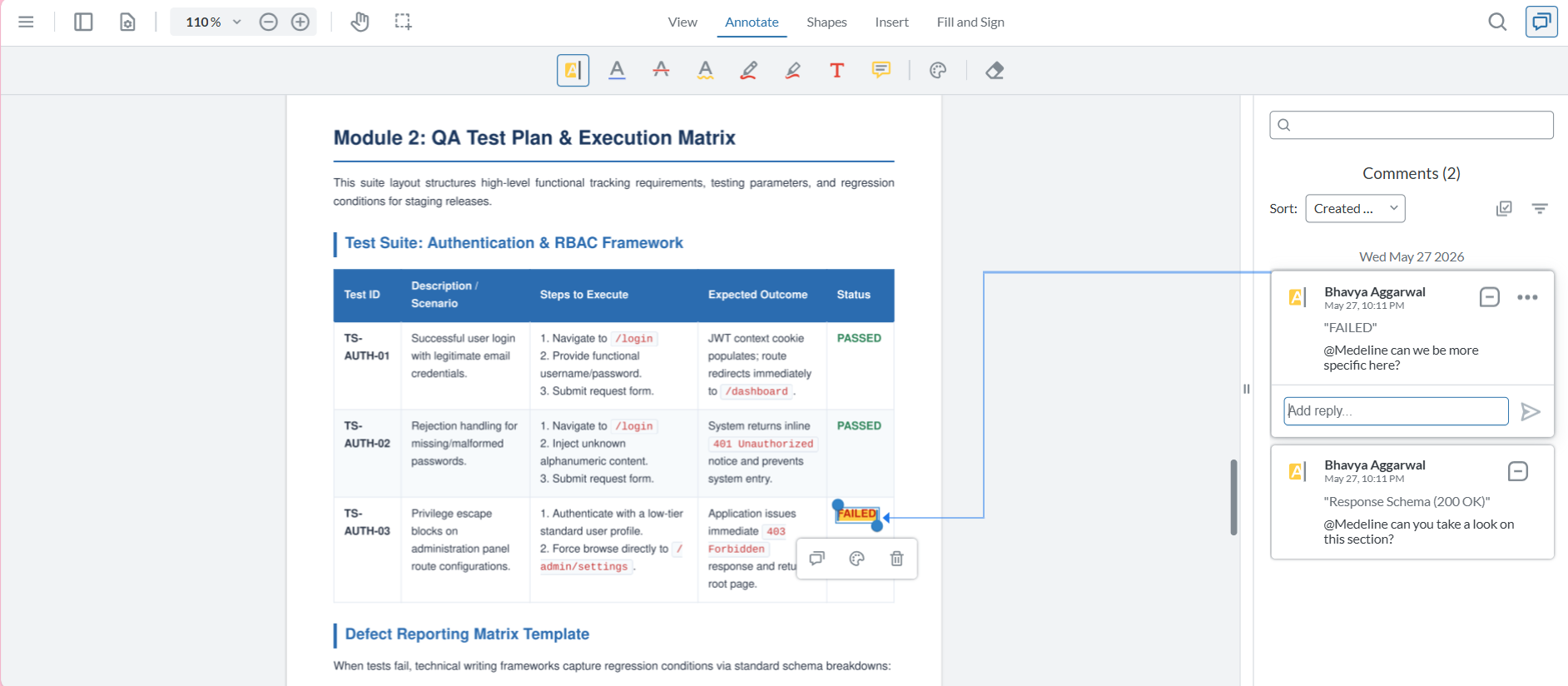
Eliminate long, text-heavy emails and vague chat explanations when reviewing release note layouts or help center articles.
Configure your workspace parameters to generate an interactive review link for your draft documentation. When a product manager or stakeholder clicks the URL, the release layout opens natively inside their browser canvas. They can highlight text errors, drop pinpoint corrections, or draw rectangles over formatting issues directly on the asset—transforming copy edits into immediate, actionable tasks.
3. Automatically Capture Release Context Behind Every Change
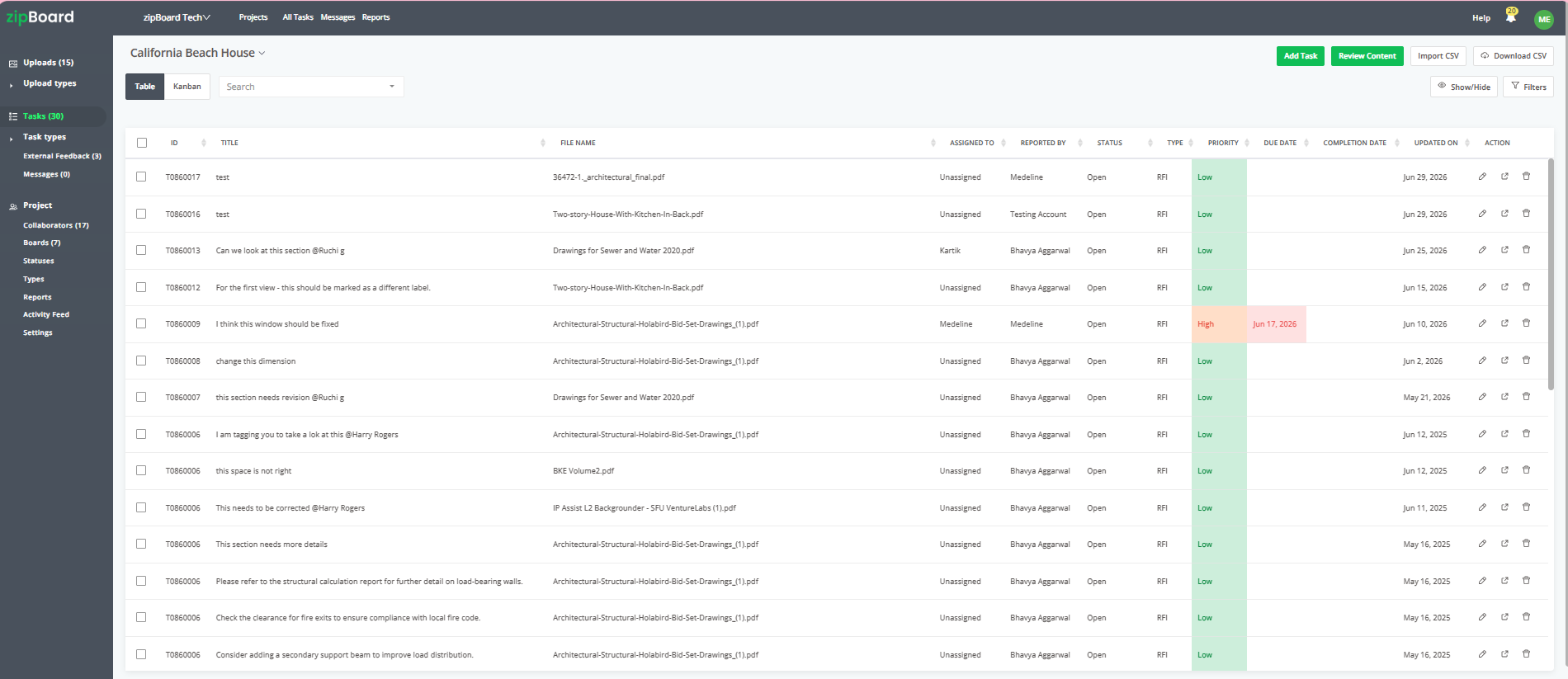
Removing review friction shouldn't mean losing the technical details required to ensure accurate customer-facing documentation.
Ensure your tracking log captures data seamlessly in the background. When an internal stakeholder or client drops an optimization pin or approves a paragraph, the platform automatically records the user identity, timestamps, and exact document page, attaching this metadata cleanly to the permanent tracking sheet.
4. Consolidate Revision Feedback Into a Unified Task Board
When an internal reviewer or compliance team member drops a markup pin onto the documentation review link, the backend automatically logs it as a trackable task. Your content managers and product marketers can prioritize, tag, and organize these documentation tasks across Kanban or Table views without reviewers ever cluttering your master engineering backlog.
Frequently Asked Questions (FAQ)
How can internal stakeholders leave documentation feedback if they don't have technical platform seats?
When an internal stakeholder accesses the documentation canvas via a secure review link, they can click anywhere on the page to drop a visual pin, highlight text, or leave a comment. The system will simply prompt them to input their name or initials before saving the markup. This permanently tags their feedback, providing your technical writers with a clear audit trail without forcing the reviewer to go through a complex account registration process.
Can these documentation review links be safely used for confidential or unreleased product features?
Yes. While removing the account login requirement eliminates user friction for internal testers or selective early-access clients, administrative control over your intellectual property remains fully secure. From your project dashboard, you can protect unreleased technical assets by enforcing unique passwords, opting for a strict "must-login" parameter for specific sensitive documents, or setting hard expiration dates so the link deactivates automatically after the launch window.
Will different internal departments or client groups see each other's documentation comments on the same link?
This depends entirely on your workflow configuration. When you generate a secure share link, you can adjust the visibility parameters to allow all internal testers to see existing annotations for collaborative alignment, or restrict permissions so users can only view their own team-specific markups, keeping cross-organization feedback completely private.