
How do I avoid license sharing when sending web designs to external client reviewers?
The most efficient way to avoid unauthorized license sharing or budget bloat is to utilize a platform built for flexible guest access management. By utilizing a browser-first workspace like zipBoard, you can gather unlimited client feedback securely without purchasing extra seat licenses or sharing internal team credentials
The True Cost of Seat Inflation and Credential Sharing
When collaboration tools charge strictly on a per-user basis, teams often resort to high-risk workarounds to stay within budget:
- The Shared Password Security Gap: Sharing a single internal team login with an entire client organization makes it impossible to verify an individual reviewer's identity, destroying your system audit trail.
- Exploding SaaS Subscriptions: Purchasing full-access licenses for short-term client reviewers who only need to look at a webpage a few times a year quickly drains project profitability.
- Onboarding Friction: Forcing external stakeholders to walk through multi-step profile setups and password configurations often leads to adoption resistance, stalling your review cycles.
4 Steps to Secure, License-Free Client Reviews
To protect your budget and preserve system integrity, transition your external delivery stream away from account-bound invitations toward a secure, link-based configuration.
1. Separate Creation Seats From Review Access
Stop treating designers, developers, and client reviewers as equivalent users in your account permissions ledger.
Set up your master dashboard so your internal production team retains full editing and project configuration seat licenses. When it's time for client validation, shift the delivery to a dedicated external review tab in your project dashboard, keeping your core development directories restricted.
2. Leverage No-Login External Share Configurations
Eliminate account creation entirely for external clients, vendor partners, and regulatory compliance reviewers.
Configure your project security parameters to generate an external review link. This builds a frictionless, no-login experience for the client. When the client clicks the secure URL, the live web mockup or staging target opens natively inside their browser canvas instantly—allowing them to leave clear feedback without ever registering an account.
3. Enforce Strategic Access Guardrails
Removing the login wall doesn't mean sacrificing security. You can maintain absolute administrative control over your intellectual property.
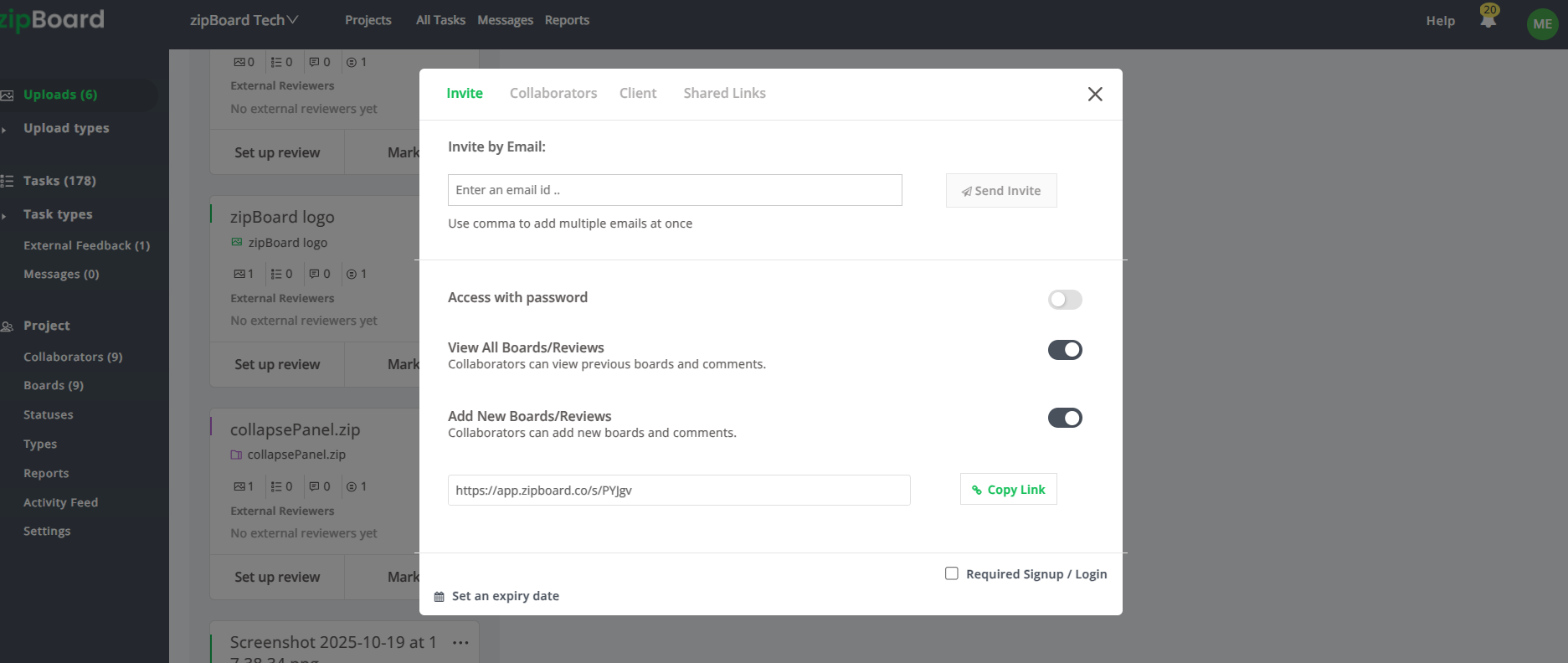
Protect your pre-release web targets by layering precise link restrictions directly from your dashboard. You can enforce unique passwords or configure hard expiration dates to ensure your technical assets stay confidential.
4. Consolidate Client Feedback Into an Internal Task Board
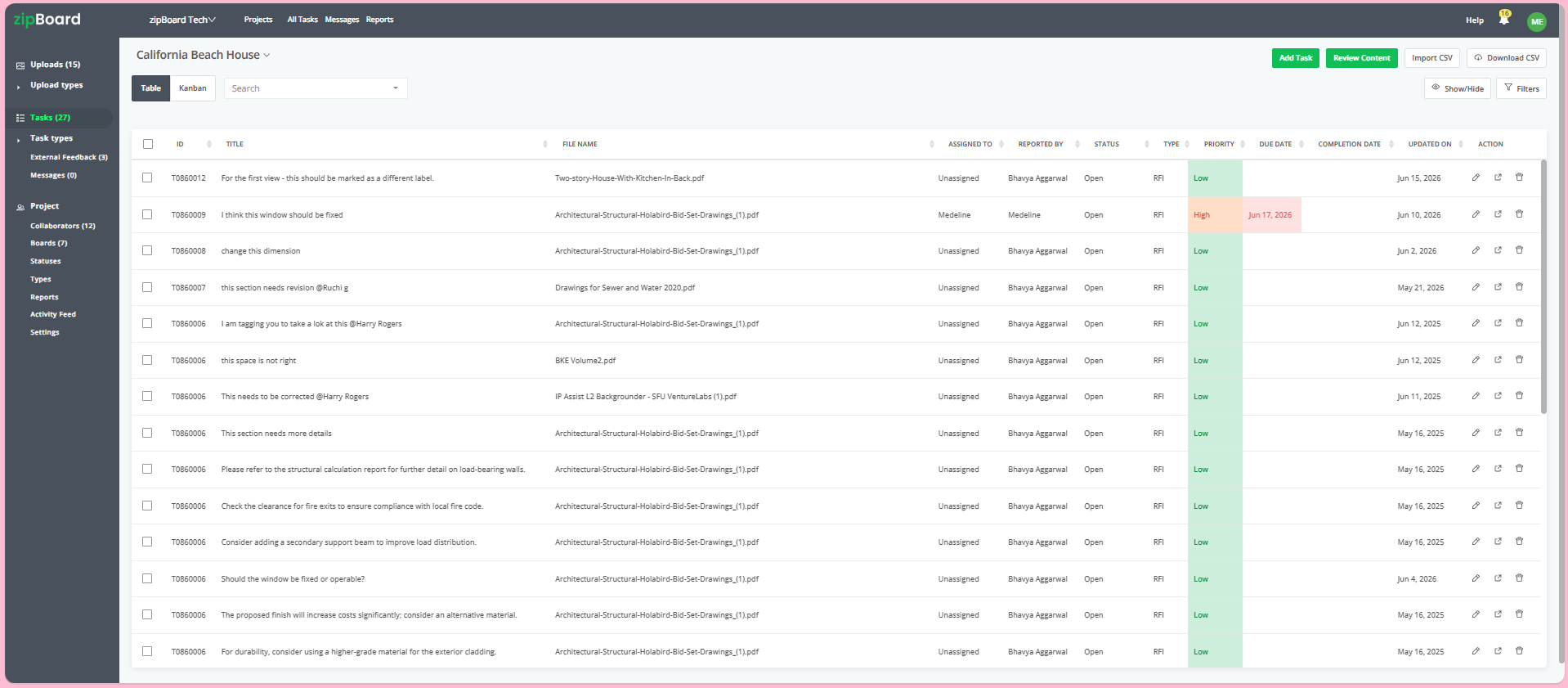
When an external guest drops a visual annotation or pin onto the public review link, the system automatically recorded that markup or comment. Your development team can review, prioritize, and track these comments across Kanban or Table boards without the client ever seeing your internal technical velocity logs.
Best Practice: Version-Stack to Keep Feedback Contextual
Web reviews move fast, and client requests often change across different project phases. To prevent your workspace from cluttering with redundant review links for every single design adjustment, use version stacking.
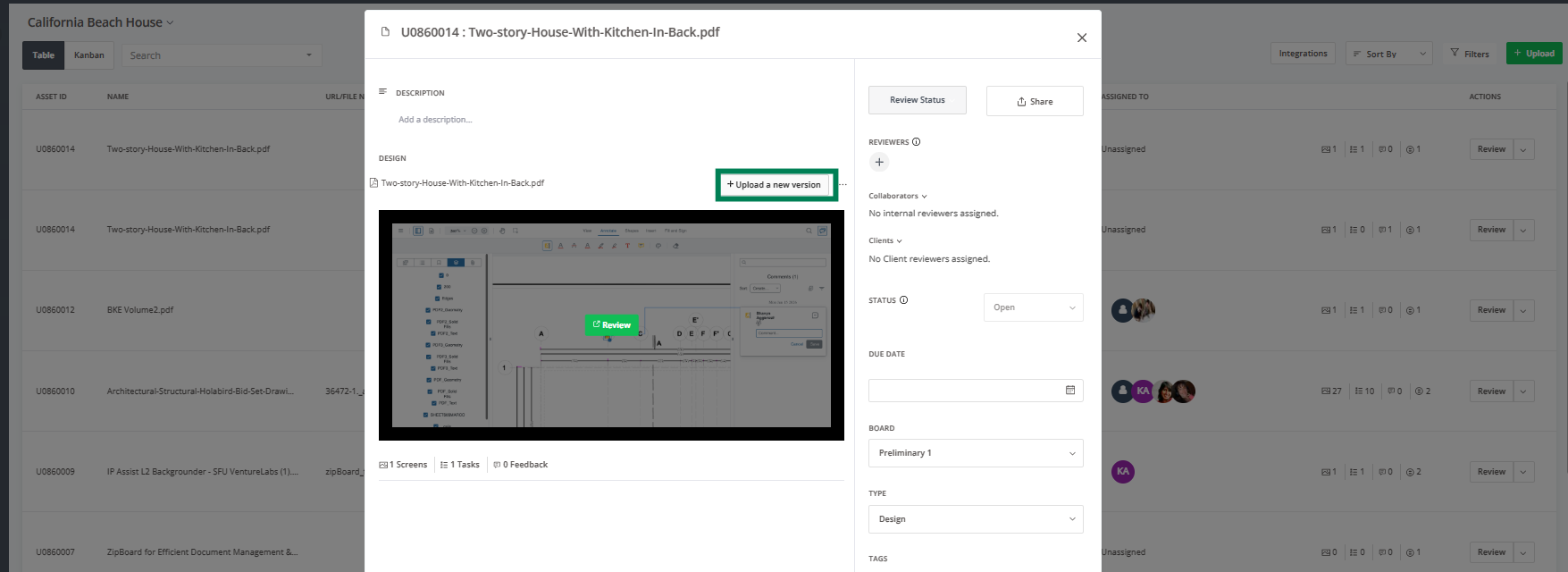
When your team updates the web layout or fixes reported bugs, upload the new target iteration directly on top of the original asset profile. This automatically archives prior client conversations, resolved issues, and visual markup pins into an immutable history ledger, giving you a clear audit trail while keeping the client’s single review link updated with the latest version.
Frequently Asked Questions (FAQ)
How can external clients leave feedback if they don't have an account or login credentials?
When an external reviewer accesses the canvas via a secure public share link, they can immediately click anywhere on the web design to drop a pinpoint or visual comment. The system will simply prompt them to enter their name or initials before saving the comment. This tags their feedback permanently, giving your development team a clear audit trail without forcing the client to register a profile.
Can secure, no-login review links be safely used for confidential or pre-release designs?
Yes. While removing the login requirement eliminates friction for your clients, you maintain complete administrative control over your intellectual property. From your project dashboard, you can restrict access parameters by enforcing unique passwords, opting for must login option, or setting hard expiration dates so the link automatically deactivates after a set period.
Will different external clients or stakeholders see each other's comments on the same link?
This is entirely up to your workflow preferences. When generating an external share link, you can configure the permissions to allow all guest reviewers to see existing annotations for collaborative alignment or restrict the view to only external reviewers' comments and feedbacks, keeping cross-organization comments entirely private.