
Why is our technical document review process taking longer than writing the draft?
When the review phase takes exponentially longer than the actual writing phase, it is rarely a problem with the writer's speed. Instead, it is a symptom of review friction, the administrative overhead, fragmented tools, and communication bottlenecks that occur when moving a draft through Subject Matter Experts (SMEs), product managers, and engineering leads.
The Root Causes of the Review Bottleneck
If your documentation pipeline feels stalled, the delay typically stems from three systemic issues:
1. High Software and Login Friction for SMEs
Your engineers and product managers live in tools like Jira, GitHub, or IDEs. They do not want to create an account, memorize a password, or learn a heavy new platform just to review a single help article. When an email notification demands they log into an unfamiliar system, they push the task to the bottom of their to-do list.
2. Contextless Feedback Loops
When a reviewer leaves a comment like "This step is inaccurate" in an email, Slack message, or unanchored spreadsheet row, the technical writer is left guessing. Without seeing the exact context, UI state, or text string the SME was looking at, the writer has to schedule a follow-up meeting just to clarify the feedback.
3. Missing Status Visibility
When a document requires sequential sign-offs, spreadsheets and email chains fail to show who currently "owns" the delay. Project managers waste hours manually pinging team members simply to ask, "Have you looked at this draft yet?"
4 Steps to Make Reviews Faster Than Drafting
To flip the script and accelerate your documentation approvals, you need to transform your review pipeline from a passive storage folder into an active, frictionless workflow using a centralized platform like zipBoard.
1. Eliminate the Account Barrier for Reviewers
The fastest way to get an engineer to review your document is to make it require zero effort to access.
- The Shift: Treat busy internal SMEs and external stakeholders as Guest Reviewers rather than system users.
- The Action: Generate a secure shareable link for your documentation asset. Configure the settings for a "no-login, frictionless experience." When the reviewer clicks the link, the document opens instantly in their web browser—no registration or training required.
2. Centralize Oversight in a Single Window
Stop digging through sent emails or Slack histories to check if an engineer has started their review.

- The Shift: Consolidate your reviewer tracking onto the document canvas itself.
- The Action: You can add collaborators directly to an asset and send automated review invitations. The side panel displays a real-time audit trail showing exactly when the invite was sent and whether the reviewer has updated their status or approved the file. This keeps accountability completely transparent in a single window.
3. Capture Visual, Tool-Agnostic Context
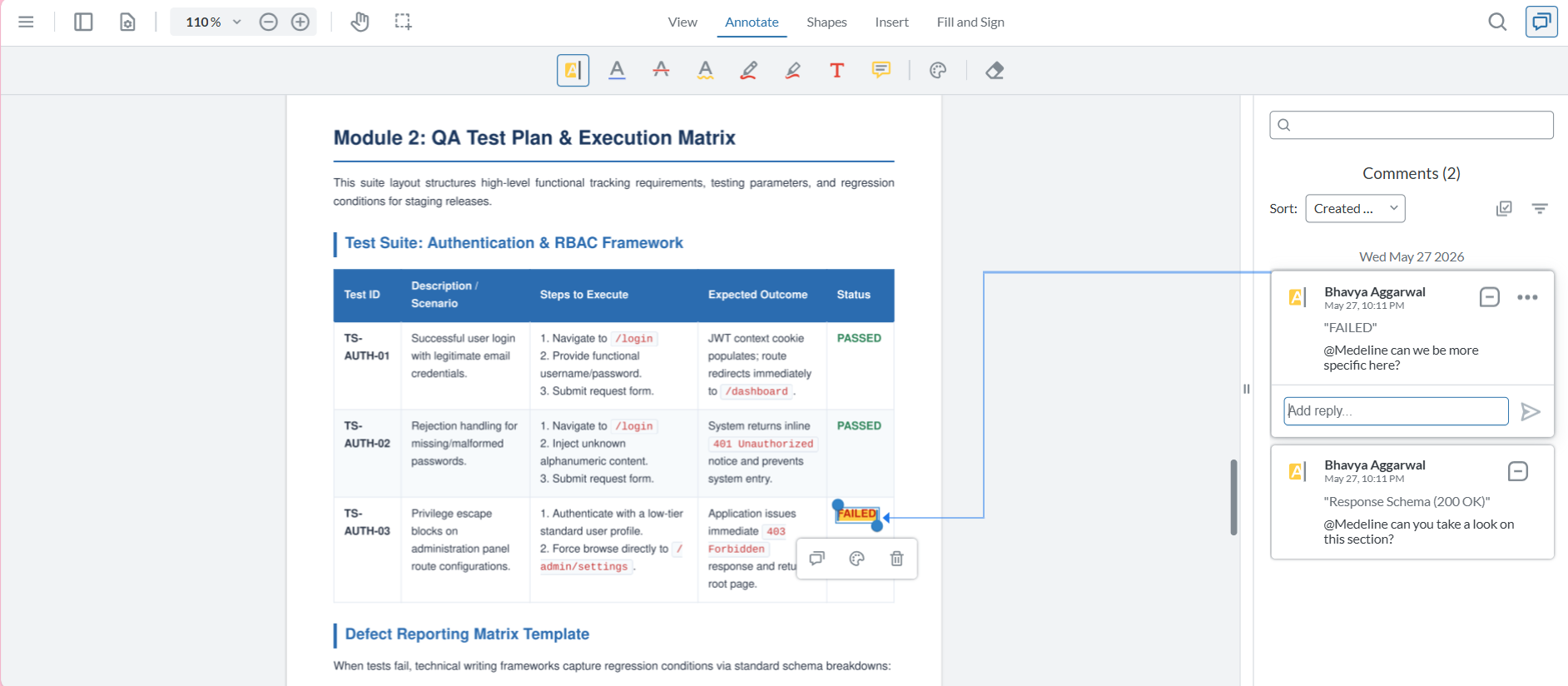
Ensure that every piece of feedback is crystal clear and actionable the moment it is written.
- The Shift: Move away from vague text comments and adopt visual canvas markups.
- The Action: Provide your SMEs with a simple, browser-first toolbar containing highlighters, rectangles, and pencils. When a reviewer marks up a document or highlights a technical error, the system automatically captures a background screenshot tied to that feedback, ensuring your writing team sees exactly what the reviewer saw.
4. Use Global Activity Feeds and @Mentions Instead of Status Meetings
Stop hosting alignment meetings just to review open comments and release edits.
- The Shift: Transition to asynchronous, centralized communication.
- The Action: Encourage your team to check the global activity feed daily to see a unified, chronological timeline of all document updates, revisions, and status changes at a single glance. If a writer needs immediate clarification on a technical point, they can use an @mention to tag the specific SME inside the task comment, triggering an instant, direct alert that cuts through inbox noise.
Frequently Asked Questions (FAQ)
How do we keep our technical documentation organized if we drop spreadsheets?
By organizing your workspace around Assets and Tasks. In a platform like zipBoard, your user guides or API manuals are uploaded as core Assets, which can be assigned to multiple SMEs for concurrent reviews. The individual typos, structural edits, or content gaps identified during those reviews automatically generate trackable and actionable Tasks.
Won't a no-login link compromise our unreleased product documentation?
Not if you use granular security controls. While the link removes the barrier of creating an account, you retain absolute authority over the URL. You can set expiration dates, password-protect the link, or restrict access so that guest reviewers can only view and comment on their specific assigned files without gaining visibility into your broader project workspace.
How do we handle major documentation rewrites and version control?
Instead of creating confusing file iterations like UserGuide_v2_final_EDITED.pdf, use version stacking. You can click "Upload a new version" directly within the asset panel to place the revised draft on top of the old one. The system preserves all historical drafts, comments, and resolved tasks, allowing you to cycle back through versions to verify that every technical correction was implemented accurately.