
What is the best free alternative to Adobe Acrobat for simple documentation markups?
When it comes to marking up documents, adding annotations, and gathering feedback, many teams automatically turn to Adobe Acrobat. However, heavy software, clunky interfaces, and costly licensing often leave teams looking for a more agile, collaborative alternative. If you are looking to simplify your document markup and approval process, the ultimate solution isn't just another standard PDF reader—it’s zipBoard.
The Problem with Traditional Document Markups
In fast-paced industries like AEC (Architecture, Engineering, and Construction), finance, legal, manufacturing, and e-learning, document approvals are absolutely critical. Relying on traditional desktop PDF tools or paper-based workflows for markups frequently leads to project stalls, suffered productivity, and costly communication errors.
Why Teams are Looking for Adobe Acrobat Alternatives
While Adobe Acrobat has long been the default choice for handling PDFs, modern fast-paced teams are increasingly realizing that a tool built for individual document editing isn't equipped for collaborative, multi-stakeholder workflows. Relying on traditional desktop PDF applications for team-wide or client-facing markup processes creates significant operational hurdles:
- Prohibitive Per-Seat Licensing Costs: At roughly $16.99 to $23.99 per user per month for team tiers, providing Adobe Acrobat licenses to every internal team member, short-term external contractor, and client reviewer scales your SaaS budget exponentially. Paying full subscription rates for a stakeholder who only needs to review a document a few times a year quickly drains project margins.
- Version Control and Fragmentation Chaos: When a team sends a PDF out for review via traditional tools, stakeholders often download the file, add their own isolated desktop comments, and email back separate, fragmented versions. Manually consolidating feedback from five different marked-up files into a single master sheet is an operational bottleneck that invites costly human errors.
- The Heavy Software Download Bottleneck: Forcing external clients or cross-departmental executives to download desktop apps, manage software updates, or register dedicated profiles just to review a file introduces immediate adoption friction. If the client can't open the document smoothly, your entire project review cycle stalls.
- Disconnection From Production Management: Traditional PDF annotations live inside the document itself, completely cut off from your actual project tracking systems. Teams are left with the tedious manual task of translating visual PDF comment pins into actionable internal tasks on separate engineering, design, or content tracking boards.
Streamline Collaboration with zipBoard’s Features
zipBoard revolutionizes how teams review digital assets by moving beyond basic PDF editing and focusing on streamlined, web-based collaboration. Whether you are working on e-learning content, construction submittals, legal contracts, or creative product designs, zipBoard simplifies the process with a powerful suite of features:
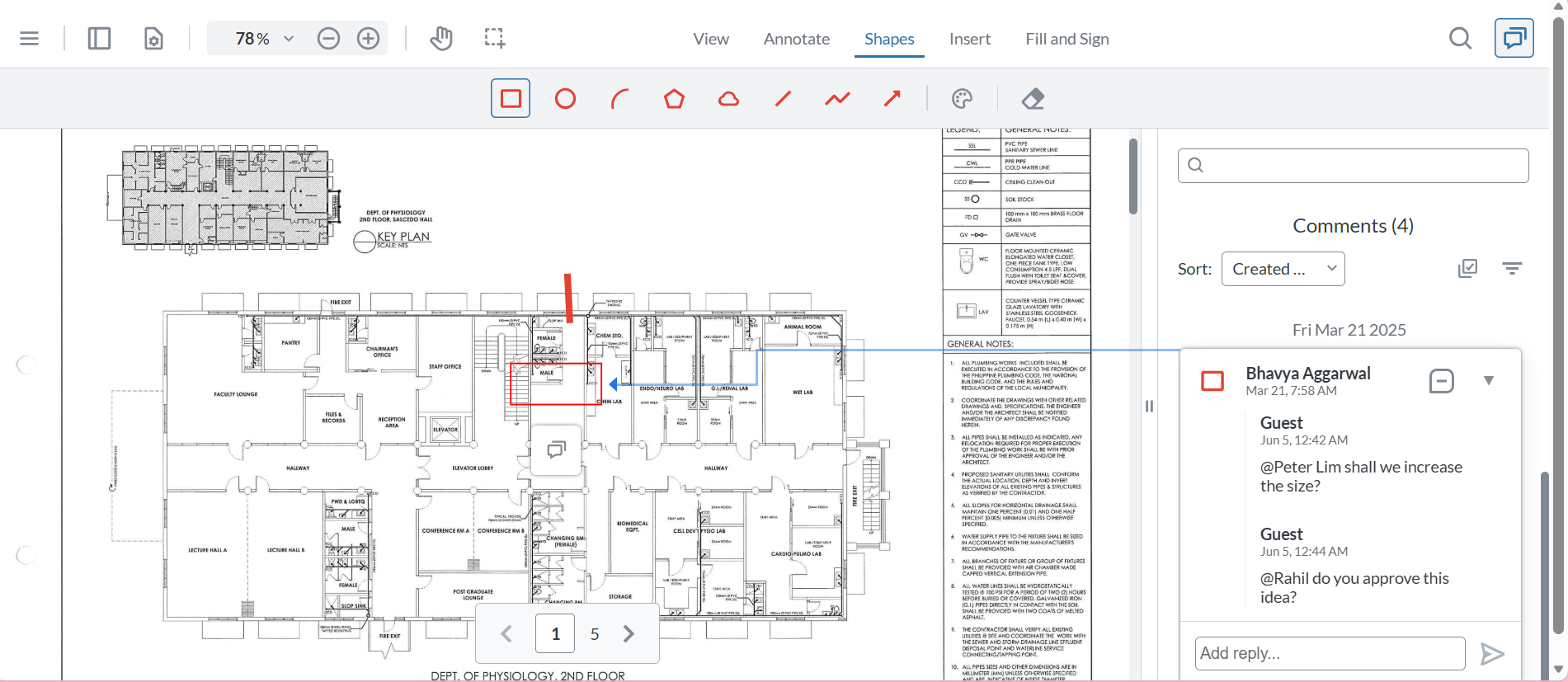
- Visual Review & Annotation Tools: Say goodbye to long, confusing emails explaining where a change needs to happen. zipBoard allows users to drop clear, visual markups and comments directly onto digital assets so everyone knows exactly what needs fixing.
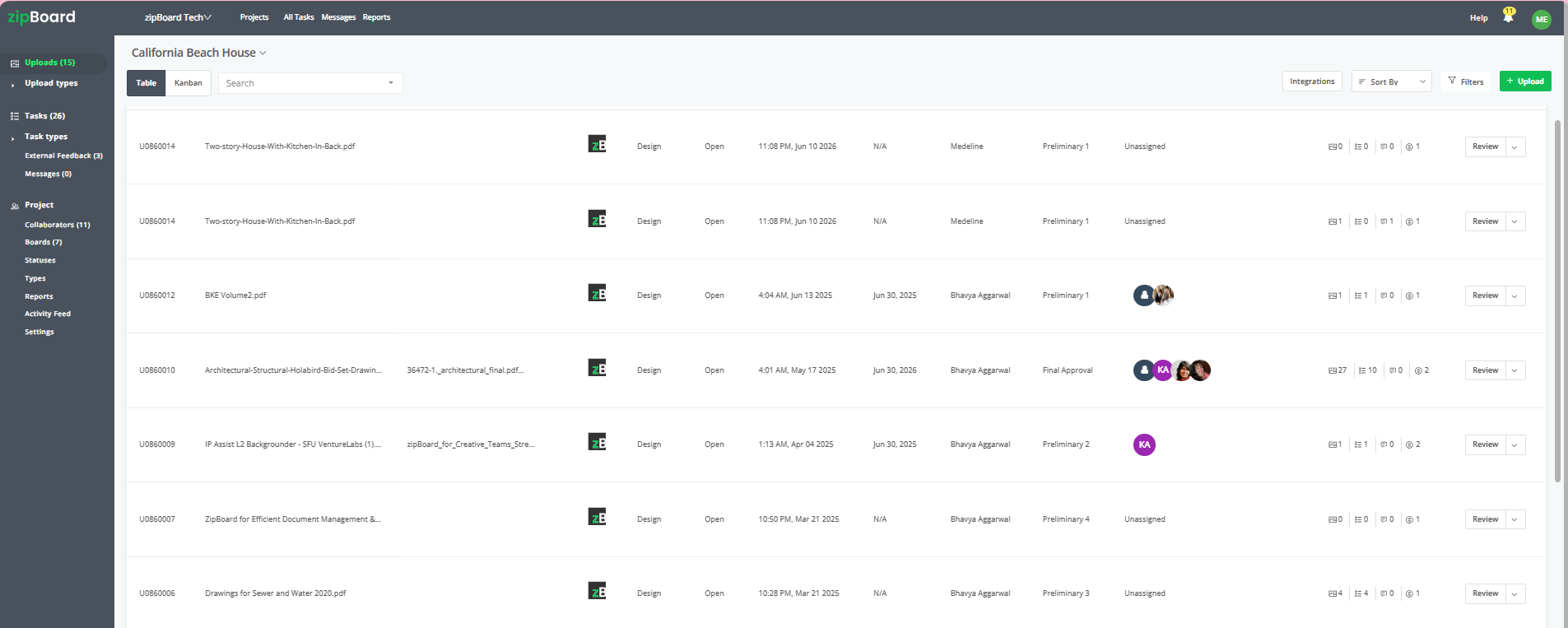
- Centralized Content Review: Review PDFs, images, web pages, and e-learning courses all in one single interface. You don't need multiple applications just to look at different file types.
- Automated Notifications: Keep your projects moving seamlessly. Team members and stakeholders receive automated updates when markups are added or when an asset is ready for approval, eliminating the need to constantly chase people down.
- Seamless Document Integration: zipBoard integrates smoothly with your existing document management systems, ensuring your files stay secure and organized within your established workflows.
Switching from heavy PDF editors to an agile review workflow pays off. Teams integrating zipBoard experience a 30% reduction in document approval times, allowing them to enhance collaboration, ensure compliance, and hit critical project milestones much faster.
Best Practice: Version-Stack to Keep Feedback Contextual

Document revisions move fast, and client requests often change across different project phases. To prevent your workspace from cluttering with redundant review links for every single minor document adjustment, use version stacking.
When your team updates a file or fixes reported issues, upload the new document iteration directly on top of the original asset profile. This automatically archives prior client conversations, resolved issues, and visual markup pins into an immutable history ledger, giving you a clear audit trail while keeping the client’s single review link updated with the absolute latest version.
Frequently Asked Questions (FAQ)
How can external clients leave feedback if they don't have an account or login credentials?
When an external reviewer accesses the document canvas via a secure public share link, they can immediately click anywhere on the file to drop a pinpoint, draw an annotation, or leave a visual comment. The system will simply prompt them to enter their name or initials before saving. This tags their feedback permanently, giving your production team a clear audit trail without forcing the client to register a profile.
Can secure, no-login review links be safely used for confidential or pre-release documents?
Yes. While removing the login requirement eliminates friction for your clients, you maintain complete administrative control over your intellectual property. From your project dashboard, you can restrict access parameters by enforcing unique passwords, opting for a "must-login" option for specific files, or setting hard expiration dates so the link automatically deactivates after a set period.
Will different external clients or stakeholders see each other's comments on the same link?
This is entirely up to your workflow preferences. When generating an external share link, you can configure the permissions to allow all guest reviewers to see existing annotations for collaborative alignment, or restrict the view to only show an individual external reviewer's own comments, keeping cross-organization feedback completely private.